EA250Pro edge AI computer with NVIDIA Jetson Orin NX 16GB, 157 TOPS, 4-channel GMSL2/Ethernet cameras, TensorRT, and Y-series IO enables multi-channel industrial visual inspection and machine vision.
Case Details
Series positioning: The fourth article in the EA250Pro product deep-dive series. Written for factory automation engineers, machine vision solution providers, and production line transformation decision-makers.
Reading benefit: After reading this article, you will have a clear understanding of the real requirements that industrial visual quality inspection places on edge computing, how multiple cameras achieve synchronized inference, and how the EA250Pro completes the full closed loop of "inspection–decision–execution" beside the production line.
Core conclusions:
- Industrial visual quality inspection is evolving from "single-station, single-camera" to "multi-station, multi-camera parallel operation," placing higher demands on the multi-channel access and parallel inference capabilities of edge computing.
- The core of multi-camera synchronization is not "taking photos at the same time," but "timestamp alignment + unified inference scheduling."
- After TensorRT optimization, YOLOv8 inference speed on Jetson Orin NX can increase by 2–5 times, meeting production line takt time requirements.
- The EA250Pro's 4-channel GMSL2/Ethernet camera input + 157 TOPS computing power + Y-series IO board forms a complete closed loop of "perception–decision–execution."
1. First, Let's Clarify: What Are the Real Pain Points of Industrial Visual Quality Inspection?
Many factory owners still think of AI quality inspection as "buy a camera, install some software, and you can detect defects." But those who have actually deployed solutions on production lines know it is not that simple.
Pain Point 1: Manual inspection has low efficiency and poor consistency.
In traditional factory visual inspection, the effective rate is often only about 80%, and most systems lack complete inspection records — quality traceability basically relies on "memory." If you ask an inspector, "Why did that batch from last Wednesday have defects?" he might say, "Maybe the lighting wasn't very good that day?"
What is more troublesome is that manual inspection standards "drift" — when just starting work in the morning, the inspector is energetic and inspection is strict; when tired near the end of the afternoon shift, standards loosen. On the same production line, quality standards may differ from shift to shift.
Pain Point 2: Multiple stations require multiple devices, resulting in high cost and difficult collaboration.
A production line may have multiple inspection stations: incoming inspection, in-process inspection, and final inspection. The traditional approach is to equip each station with an industrial PC + camera. Equipment costs are high, and data is not interoperable between stations, making full-process quality traceability impossible.
Pain Point 3: The production line takt is fast; inference must keep up.
A high-speed production line may have a takt of 2–3 workpieces per second. This means that from camera capture to AI decision to sorting execution, the entire process must be completed within a few hundred milliseconds. Cloud inference is simply too slow; edge inference must be completed beside the production line.
2. Multi-Camera Synchronization: Not as Simple as "Taking Photos at the Same Time"
When you connect 4 cameras to one edge computer, the first problem to solve is synchronization.
"Synchronization" does not mean making 4 cameras press the shutter at exactly the same time — this is very difficult to achieve perfectly at the hardware level. True synchronization is timestamp alignment + unified inference scheduling.
Timestamp alignment: Each camera stamps a high-precision timestamp when capturing an image. If the camera supports hardware triggering (such as the GMSL2 synchronization signal), microsecond-level alignment can be achieved. If the camera only supports software triggering, timestamp precision depends on operating system scheduling and is usually at the millisecond level.
Unified inference scheduling: After 4 channels of images enter the edge computer, inference resources need to be scheduled uniformly. If the 4 video streams each run inference independently, they will contend for GPU resources, causing increased latency on some channels. The correct approach is to combine the 4 channels of images into one batch, send them to the TensorRT engine for inference at once, and then output the results separately.
The benefit of this approach is higher GPU utilization and greater overall throughput. The cost is a slight increase in single-frame latency — but for production line inspection scenarios, throughput is more important than single-frame latency.
3. TensorRT Optimization in Practice: How Fast Can YOLOv8 Run on Orin NX?
Now that the theory is clear, let's look at actual data.
Benchmark: PyTorch vs TensorRT
A hardware-aware optimization study for YOLOv8 showed that applying TensorRT graph optimization — including Conv-BatchNorm-activation layer fusion and FP16 precision — increased single-stream inference throughput from a PyTorch FP32 baseline of 62.92 FPS to 72.72 FPS, a speedup of 15.6%, while detection accuracy remained almost unchanged (mAP@0.5 dropped from 52.8% to 52.6%).
Multi-Channel Parallel: 4-Channel 1080P Simultaneous Inference
On Jetson Orin NX 16GB, using the TensorRT-optimized YOLOv8n model, four 1080P@30fps video streams can run inference simultaneously, with each channel maintaining an inference frame rate of 25+ FPS. This means the detection latency per station is kept within 40 ms, fully meeting production line takt requirements.
If a larger model is used (such as YOLOv8m), single-channel inference speed will decrease, but this can be balanced by lowering the inference frame rate (such as 15 FPS). Production line inspection does not necessarily require 30 FPS — if the production line takt is 2 workpieces per second, 15 FPS is already sufficient.
INT8 Quantization: Double the Speed, Slight Accuracy Drop
INT8 quantization is key to TensorRT acceleration. Converting an FP16 model to INT8 can further increase inference speed by 30%–50%. But note: accuracy must be verified after quantization.
Some teams used TensorRT implicit quantization and saw accuracy plummet from 94% to 75%. They later restored it to 94% through manual dynamic range calibration. Therefore, after quantization, be sure to validate accuracy with real production line data — do not just look at speed.
4. The EA250Pro's Solution: One Device Handles 4-Channel Inspection
The hardware configuration of the EA250Pro precisely matches the core requirements of multi-channel visual quality inspection.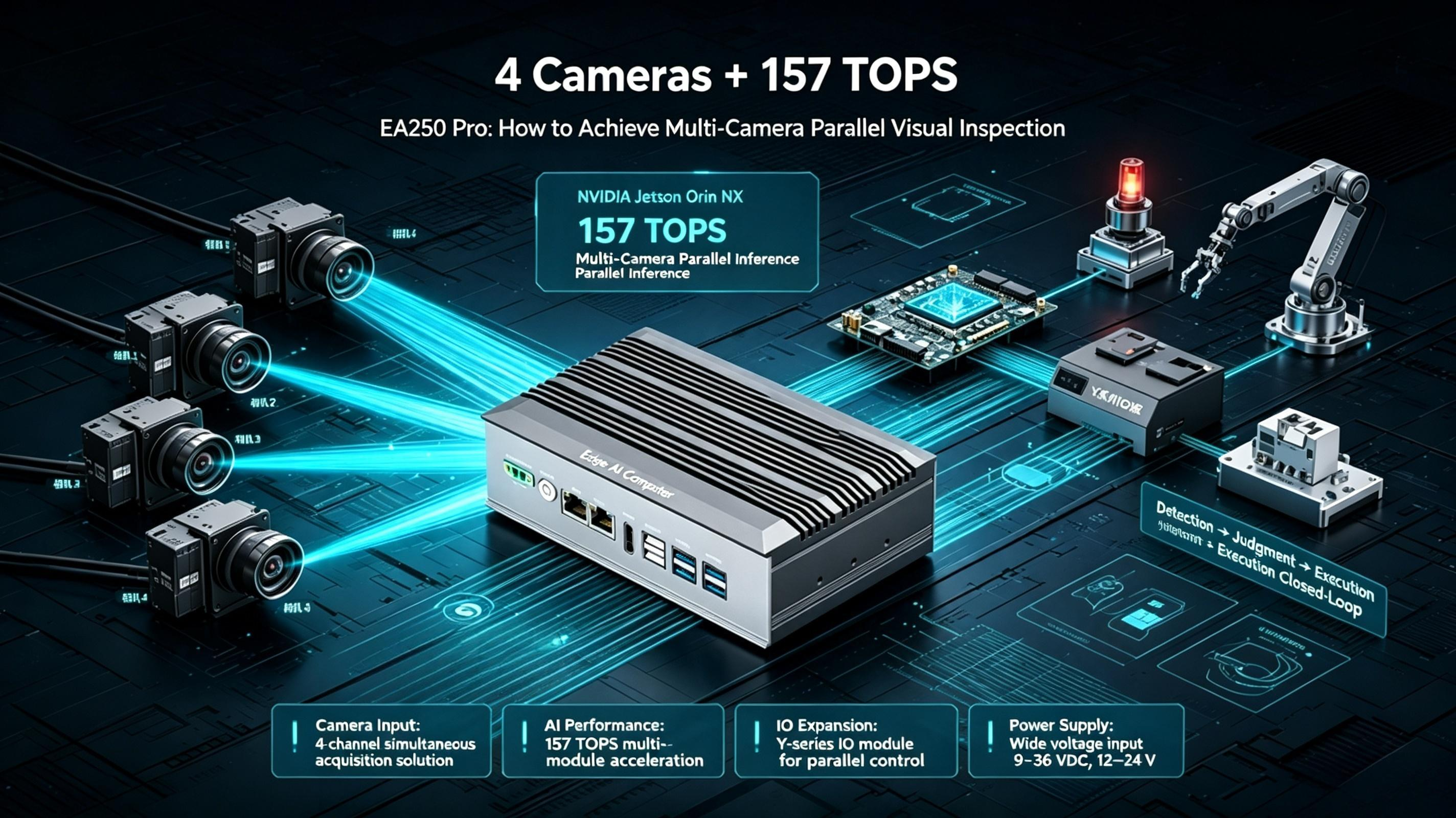
4.1 Camera Input: 4 Options, Choose as Needed
The EA250Pro supports flexible selection of 4-channel USB 3.0, 4-channel GMSL2 industrial cameras, 4-channel Gigabit Ethernet cameras, or 4-channel MIPI CSI-2 cameras.
The GMSL2 option is suitable for production line transformation scenarios: coaxial cable supports 15-meter transmission distance and Power over Coax (PoC), with one cable handling both data and power, suitable for production lines where cameras and cabinets are far apart.
The Gigabit Ethernet option is suitable for factories with existing network cable infrastructure: no need to re-cable, directly connect using existing network cables, and PoE power supply simplifies camera-side cabling.
The USB option is suitable for desktop-level or single-station inspection: plug-and-play, easy development, and compatible with mainstream commercial industrial USB cameras.
4.2 Computing Power: Jetson Orin NX Onboard, 157 TOPS for Multi-Channel Parallel Inference
The EA250Pro is equipped with NVIDIA Jetson Orin NX 16GB, providing up to 157 TOPS of INT8 computing power. The eight-core Cortex-A78AE processor (clocked at 2.0 GHz), combined with 1024 CUDA cores and 32 fourth-generation Tensor Cores, provides ample computing power for parallel inference of multiple video streams.
16GB LPDDR5 memory is key. During multi-channel inference, model weights and intermediate feature maps require a large amount of memory. 16GB can simultaneously load multiple models and support 4-channel video stream parallel inference without triggering memory swapping.
In terms of video encoding and decoding, the EA250Pro supports 1-channel 4K60 encoding / 1-channel 8K30 decoding, and can simultaneously handle encoding and decoding tasks for multiple high-definition video streams.
4.3 IO Expansion: Y-Series IO Board, Full Closed Loop from Inspection to Decision to Execution
After a defect is detected, an actuator must be controlled to remove the defective product. Through the Y-series IO board, the EA250Pro can expand up to 2-channel CAN FD, 4-channel RS485, 16-channel DI, and 8-channel DO.
In visual quality inspection scenarios, these IO interfaces can be used as follows:
- DI: Connect to the production line PLC's workpiece-in-position signal to trigger camera capture.
- DO: Drive pneumatic cylinders/solenoid valves to blow defective products into the reject bin.
- CAN FD:Communicate with the production line's main PLC and report inspection results.
- RS485:Connect the indicator or alarm to remind the operator in case of abnormality.
An EA250Pro, from the camera to the actuator control, is all inclusive.
4.4 Wide Temperature, Wide Voltage: -20°C to +75°C, 12V–24V
In summer, the production environment may exceed 40°C; in winter, in an unheated workshop, it may drop below 0°C. The EA250Pro supports wide-temperature operation from -20°C to +75°C, 12V–24V wide-voltage DC input, all-aluminum alloy enclosure, and has passed CE and FCC certifications. ESD protection reaches ±6 kV contact discharge and ±8 kV air discharge — sufficient to cope with the production line electromagnetic environment.
5. EA250Pro Deployment Recommendations in Visual Quality Inspection Scenarios
Deployment location: In a cabinet or equipment rack beside the production line; it is recommended to deploy on the same pole/rack as the cameras to reduce long cabling.
Camera selection:
- New production line, long-distance transmission: choose the 4-channel GMSL2 option.
- Existing network cable infrastructure: choose the 4-channel Gigabit Ethernet option.
- Desktop-level/single-station: choose the 4-channel USB 3.0 option.
Inference optimization:
- Use TensorRT acceleration, FP16 or INT8 quantization.
- Use batch inference for multiple video streams to improve GPU utilization.
- After quantization, accuracy must be validated with real production line data.
IO configuration: Choose the Y-board model based on the production line PLC type. If the PLC uses CANopen, choose Y80 with CAN FD; if the PLC uses Modbus RTU, choose the Y-board with RS485.
Thermal design: If the production line cabinet has poor ventilation, it is recommended to optionally equip an external variable-speed fan. The EA250Pro supports active cooling and can maintain sustained computing output in high-temperature environments.
Remote operations and maintenance: An OOB out-of-band management module can be optionally configured to remotely restart the device without going on-site.
6.FAQ: Common Questions in Visual Quality Inspection Selection
Q1: Can the EA250Pro connect four cameras of different brands simultaneously?
A: Yes. As long as the camera complies with USB, GMSL2, Gigabit Ethernet, or MIPI CSI-2 protocols, it can be connected. There is no brand restriction.
Q2: What is the latency when inferring four 1080P streams simultaneously?
A: Using the TensorRT-optimized YOLOv8n model, four 1080P@30fps streams can be inferred simultaneously, with latency per channel kept within 40 ms. If a larger model is used, the inference frame rate can be appropriately lowered to balance performance.
Q3: What should I do if accuracy drops after TensorRT quantization?
A: It is recommended to use Q/DQ nodes for explicit quantization, or manually adjust the dynamic range. After quantization, accuracy must be validated with real production line data — do not just look at speed.
Q4: How should I choose between the EA250Pro and EA230Pro for inspection scenarios?
A: For single-station or 2-channel camera inspection, the EA230Pro (67 TOPS) is sufficient. For simultaneous inference with 4 cameras or multi-model parallelism, choose the EA250Pro (157 TOPS).
Q5: Does the EA250Pro support production line PLC communication?
A: Yes. Through the Y-series IO board, it can expand CAN FD, RS485, and other industrial bus interfaces to communicate with mainstream PLCs.


